
Download NailDesignsAI – Free AI‑Powered Nail Art Generator for Windows, macOS & Linux
Overview
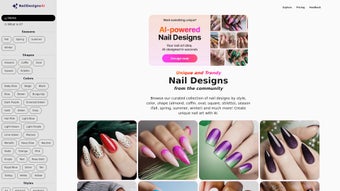
NailDesignsAI is a browser‑based, AI‑driven design platform that transforms a simple text prompt into a polished, high‑resolution nail‑art illustration in just a few seconds. The service targets three main user groups: professional nail technicians who need fresh concepts for clients, beauty influencers looking for eye‑catching visuals, and hobbyists who simply enjoy experimenting with color and pattern. By combining a skin‑tone selector, shape options, and a library of style filters, the tool creates designs that feel tailor‑made rather than generic stock images.
Because the heavy lifting happens on secure cloud servers, users enjoy instant results without installing any software, making the experience lightweight and accessible on any modern computer. The free tier grants unlimited design generation per session, though daily limits apply to keep server load balanced. While a dedicated mobile app is still on the roadmap, the responsive web interface works well on tablets and larger smartphones, ensuring that creative ideas can be captured on the go.
In short, NailDesignsAI offers a frictionless, secure, and cost‑free way to generate professional‑grade nail designs, positioning itself as a niche yet powerful tool within the broader graphics‑design software landscape.
Key Features That Differentiate NailDesignsAI
- AI‑Powered Prompt Engine: Generates original patterns from natural‑language descriptions, allowing users to type “emerald glitter with white lace” and receive a unique design instantly.
- Skin‑Tone Matching: An extensive palette of realistic skin tones helps the AI suggest complementary colors, ensuring the final artwork looks harmonious on any hand.
- Shape & Length Customization: Choose classic almond, square, stiletto, or free‑form shapes, and set nail length to influence pattern placement and scaling.
- Advanced Color Controls: Select preset palettes (pastel, neon, metallic) or input exact HEX codes for brand‑specific hues.
- Style Filters: Apply thematic filters such as minimalist, glitter, floral, geometric, or seasonal trends to steer the AI’s creative direction.
- Instant PNG & SVG Downloads: Receive raster (PNG) for quick sharing or vector (SVG) files that retain crisp edges at any size—ideal for print‑ready marketing material.
- Secure Cloud Processing: All data transmission is encrypted via HTTPS; prompts are not stored after the session ends, protecting user privacy.
- Regular Model Updates: The development team pushes new style modules and seasonal palettes monthly, keeping the library fresh without user intervention.
- API Access for Power Users: A free API key enables batch generation, allowing salons or e‑commerce sites to automate design creation.
Beyond the bullet‑point list, NailDesignsAI incorporates subtle usability enhancements that mimic a professional design studio. Real‑time preview thumbnails update as parameters change, sliders feature tactile feedback, and the interface employs a clean, whitespace‑rich layout that reduces visual clutter. For designers accustomed to desktop graphics suites, the SVG output offers unlimited scalability, making it suitable for everything from social‑media posts to large‑format print banners. Moreover, because the AI model is hosted centrally, users automatically benefit from the latest algorithmic improvements, eliminating the need for manual updates or license renewals. This combination of cutting‑edge AI, deep customization, and a zero‑install approach makes NailDesignsAI a compelling addition to any beauty‑tech workflow.
Installation, Usage & Compatibility
Getting Started – No Download Required
Since NailDesignsAI is a fully cloud‑based service, there is no traditional installation. Follow these steps to create your first design:
- Open a modern browser (Chrome, Firefox, Edge, Safari) and go to naildesignsai.com.
- Click the “Start Designing” button. You’ll be prompted to select a skin tone from a realistic gradient.
- Enter a description of the desired nail art in plain English (e.g., “rose gold ombre with tiny stars”) or pick a pre‑set theme from the dropdown menu.
- Adjust optional settings: nail shape, length, color palette, and style filters. Each slider updates the preview in real time.
- Press “Generate.” Within 5–10 seconds, a high‑resolution preview appears. If you’re satisfied, click “Download” to save a PNG or SVG file.
- For developers, request a free API key from the “Developer” tab to integrate the generation engine into custom workflows.
Operating System Support Windows, macOS, Linux, Chrome OS (browser‑based)
The web‑only architecture ensures full compatibility across all major desktop operating systems. Tested browsers include:
- Windows 10/11: Edge, Chrome, Firefox – all render the interface flawlessly.
- macOS Monterey and later: Safari and Chrome provide optimal performance on Retina displays.
- Linux distributions: Chromium‑based browsers deliver a consistent experience.
- Chrome OS (Chromebooks): The responsive layout adapts to smaller screens while retaining full feature access.
Because processing occurs on remote servers, the client machine’s hardware requirements are minimal; any device capable of running a modern browser will suffice. While a native iOS/Android app is not yet available, the responsive design works on tablets and larger smartphones, though precision sliders may be easier to manipulate with a mouse or trackpad.
Pros & Cons
Pros:
- No software download needed – start instantly in any browser.
- Natural‑language prompts make design creation intuitive for beginners.
- Extensive customization options (skin tone, shape, color, style).
- Free SVG export preserves vector quality for professional printing.
- Secure, encrypted sessions protect user privacy.
- Regular updates keep the style library current.
- API access enables automation for businesses.
Cons:
- Requires an active internet connection; no offline mode.
- No dedicated mobile app for iOS or Android yet.
- Advanced users may miss deeper control over AI parameters.
- Free tier imposes a daily generation limit.
- Single‑prompt workflow does not support multi‑step refinement.
FAQ – Frequently Asked Questions
Is NailDesignsAI completely free to use?
The core generation and download features are free. A premium subscription removes daily limits, grants priority processing, and unlocks exclusive seasonal palettes.
Can I use the designs for commercial projects?
Yes. All designs created under the free tier are royalty‑free, allowing salons, brands, and influencers to use them in marketing, product packaging, or client presentations.
What file formats are available for download?
Users can download high‑resolution PNG (raster) or SVG (vector) files. SVG is recommended for print‑ready projects because it scales without loss of quality.
Do I need a powerful computer to run the tool?
No. Since the AI processing occurs on the server, any modern computer, laptop, or tablet with a stable internet connection can generate designs smoothly.
How is my data protected when I submit a prompt?
All communication is encrypted with HTTPS. Prompts are processed in memory and are not stored in a user‑identifiable way after the session ends, ensuring privacy.
Is there an API for bulk design generation?
Yes. A free API key can be obtained from the “Developer” section of the website, enabling batch requests for salons, e‑commerce platforms, or custom integrations.
Conclusion & Call to Action
In a crowded market of generic graphics tools, NailDesignsAI stands out by delivering AI‑generated nail‑art concepts through a simple, secure, and completely browser‑based workflow. The platform’s strengths—instant generation, deep customization, free vector export, and royalty‑free licensing—make it an invaluable resource for professionals and enthusiasts alike. While the lack of offline capability and a dedicated mobile app are minor drawbacks, they are outweighed by the speed, quality, and zero‑cost entry point. If you’re looking to stay ahead of nail‑art trends without investing in heavyweight design software, NailDesignsAI offers a fast, reliable, and future‑proof solution.
Ready to bring your nail‑art ideas to life? Visit NailDesignsAI now, generate your first design for free, and see how AI can elevate your creative process.



.png)



